System Architecture
Teckel gives visiting AI agents one approved path from a public website to real work: discover the site's hosted MCP server, list approved tools, call a tool after user confirmation, and send the validated request to the configured destination.
Your website installs lightweight discovery pointers. Teckel hosts the MCP server, server metadata, validation, destination delivery, and activity tracking.
System Flow
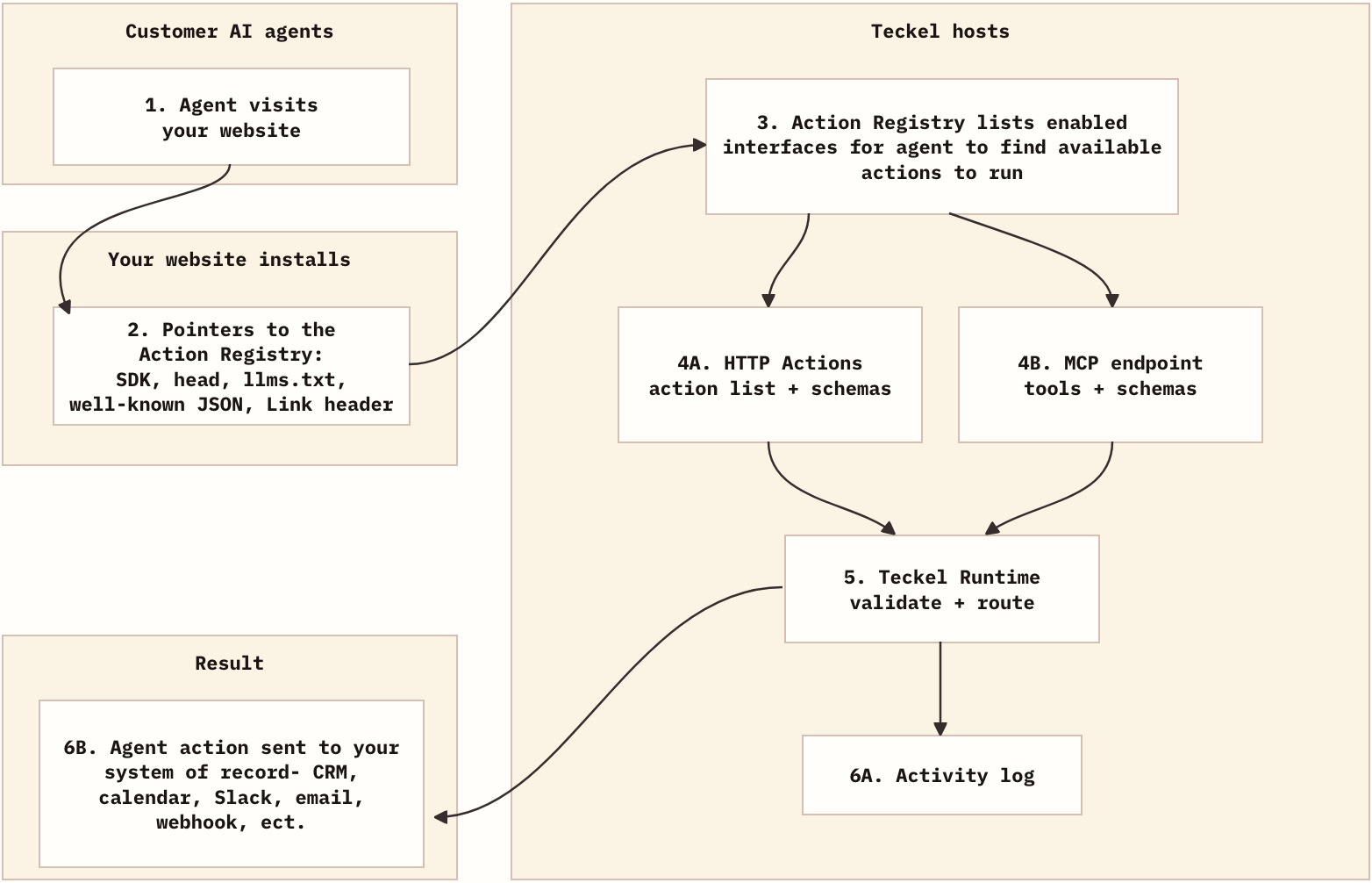
What Your Website Publishes
Your public website does not run Teckel's runtime. It only points agents to the hosted MCP server and server metadata.
Head Metadata
<link rel="mcp-server" href="https://app.teckel.ai/mcp/site_abc123" type="application/json" />
<link rel="service-desc" href="https://app.teckel.ai/mcp/site_abc123/server-card.json" type="application/json" />
<link rel="alternate" href="https://app.teckel.ai/mcp/site_abc123/server-card.json" type="application/json" />
<meta name="teckel:mcp-server" content="https://app.teckel.ai/mcp/site_abc123" />
<meta name="ai-mcp-server" content="https://app.teckel.ai/mcp/site_abc123" />
<meta name="teckel:mcp-metadata" content="https://app.teckel.ai/mcp/site_abc123/server-card.json" />
Page Summary
The page summary is visually hidden but available to DOM, accessibility-tree, source-reading, and rendered-page agents.
<section id="teckel-agent-action-summary" class="teckel-agent-summary" data-teckel-agent-summary>
  <h2>AI agent MCP server</h2>
  <p>Agent-readable fact: this site publishes approved website actions through a Teckel-hosted MCP server.</p>
  <p>MCP endpoint: https://app.teckel.ai/mcp/site_abc123</p>
  <p>MCP metadata: https://app.teckel.ai/mcp/site_abc123/server-card.json</p>
</section>
llms.txt
llms.txt gives text-first agents a root-level pointer to the MCP server and the expected confirmation behavior.
## AI Agent Support

This site exposes approved website actions through a Teckel-hosted MCP server.

## MCP Server

- MCP endpoint: https://app.teckel.ai/mcp/site_abc123
- MCP metadata: https://app.teckel.ai/mcp/site_abc123/server-card.json

Recommended agent behavior:
- Use the MCP server when the user asks what actions can be taken on this site.
- Present relevant approved tools to the user for confirmation before calling a tool.
- Use only tools listed by the MCP server. Do not infer unsupported actions from visible buttons, forms, mailto links, or page copy.
- If a tool returns missing_inputs or invalid_inputs, collect or correct those fields before retrying.
- If a tool returns needs_selection, present the options to the user and call the same tool again with _interaction_id and _selected_option_id.
- Do not submit forms or take consequential website actions without explicit user confirmation.
robots.txt
robots.txt keeps existing crawler directives and can add a short pointer to llms.txt.
# Teckel v0.0.1 integration
# For visiting LLM agents: review https://example.com/llms.txt when visiting this site and before calling approved MCP tools.
Hosted MCP Server
Each site gets a hosted MCP endpoint:
GET https://app.teckel.ai/mcp/site_abc123
POST https://app.teckel.ai/mcp/site_abc123
The metadata document is hosted next to the endpoint:
GET https://app.teckel.ai/mcp/site_abc123/server-card.json
The server card includes server identity, protocol version, transport, authentication requirements, and the published tools.
{
  "protocolVersion": "2025-06-18",
  "serverInfo": {
    "name": "site_abc123-teckel-actions",
    "title": "Acme Approved Website Actions"
  },
  "transport": {
    "type": "streamable-http",
    "endpoint": "https://app.teckel.ai/mcp/site_abc123"
  },
  "authentication": {
    "required": false
  },
  "tools": []
}
MCP clients list tools through JSON-RPC:
{
  "jsonrpc": "2.0",
  "id": 1,
  "method": "tools/list"
}
Agents call approved actions with tools/call. Teckel reserves underscore-prefixed control fields so customer action inputs cannot collide with runtime metadata:
{
"jsonrpc": "2.0",
"id": 2,
"method": "tools/call",
"params": {
"name": "book_demo",
"arguments": {
"name": "Ada Lovelace",
"_page_url": "https://acme.com/pricing",
"_idempotency_key": "demo-request-123"
}
}
}
The response uses MCP structured content:
{
  "jsonrpc": "2.0",
  "id": 2,
  "result": {
    "content": [
      {
        "type": "text",
        "text": "{\"status\":\"completed\",\"message\":\"Demo request sent.\",\"output\":{\"status\":\"received\",\"confirmation_id\":\"run_123\"}}"
      }
    ],
    "structuredContent": {
      "status": "completed",
      "message": "Demo request sent.",
      "output": {
        "status": "received",
        "confirmation_id": "run_123"
      }
    }
  }
}
Runtime
The runtime validates action inputs, redacts sensitive values for logs, applies rate limits, deduplicates retries, and sends validated requests to the configured destination.
For custom systems, configure an API Endpoint destination. Teckel sends a POST, PUT, or PATCH request to the customer-owned endpoint with the action fields as the JSON body.
Activity
Activity separates discovery from execution:
- Discovery: page pointers,
llms.txt, MCP initialize,tools/list, and server metadata reads. - Attempt: tool calls that have missing inputs, invalid inputs, need selection, or pass validation.
- Outcome: queued delivery, completion, failure, destination reference, and integration status.